

Overview of Cogover Applications
Cogover organizes business operations into apps that share the same data, process, permission, and reporting foundation. Each app covers a specific area of work while remaining connected to the others across end-to-end operations.
This document introduces 10 Cogover apps and the main functions of each one. Detailed workflows, data models, and configuration guidance will be covered in separate articles.
Actual availability depends on each Workspace configuration. Check the active apps, Objects, Processes, and permissions before implementing a business workflow.
Where apps fit in the platform
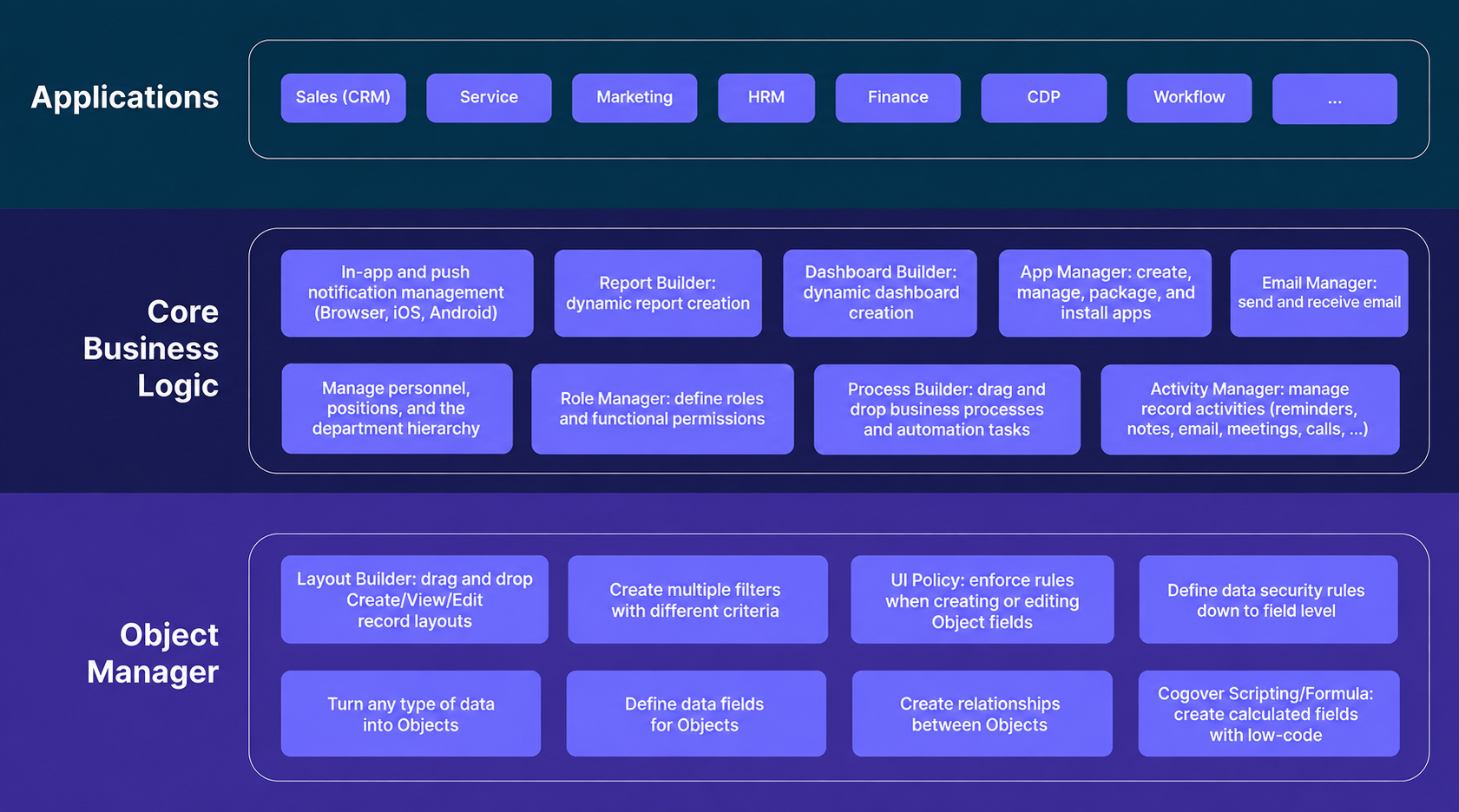
Apps sit in the Application layer. They use the data managed in Object Manager and the processing capabilities provided by Core Business Logic. This structure allows apps to share data and work together instead of operating as isolated systems.
Application list
| No. | App | Primary function |
|---|---|---|
| 1 | Sales | Customer relationship and sales management |
| 2 | Inventory | Warehouse operations, inventory movements, and stock management |
| 3 | People | Organizational structure and internal HR processes |
| 4 | Process | Business process design, execution, and monitoring |
| 5 | Omni Channel | Multi-channel conversation and messaging management |
| 6 | Finance | Operational finance, receivables, payables, and cash flow management |
| 7 | Service | Contact center and call center operations |
| 8 | Manufacture | Manufacturing, material consumption, and repair management |
| 9 | Goal | Goal setting, progress tracking, and performance measurement |
| 10 | Project Management | Project planning, task assignment, and progress tracking |
Functions by app
1. Sales
Sales manages the journey from prospecting to closing and post-sales support:
- Customer, organization, and contact records.
- Leads, lead conversion, opportunities, competitors, and partners.
- Quotes, contracts, and sales orders.
- Products, unit groups, units of measure, and price books.
- Support requests and marketing campaigns.
2. Inventory
Inventory manages product movements and stock information:
- Warehouses, storage locations, and supply routes.
- Quantity, batch, and serial tracking.
- Units of measure, unit conversions, and product bundles.
- Receipts, deliveries, returns, and internal transfers.
- FIFO, LIFO, and FEFO allocation.
- Inventory transactions linked to orders.
- Stock counts, adjustments, and inventory summaries.
- Stock ledger, costing, and transaction reports.
3. People
People uses the organizational structure to support employee records and HR activities:
- Personnel, Department, and Position management.
- Employee records organized by department and position.
- Leave requests and expense claims.
- Onboarding and offboarding tasks.
- Internal approval processes related to personnel.
4. Process
Process supports the design and operation of BPMN-based business processes:
- Process and workflow step design.
- Process activation, monitoring, and testing.
- Manual, Normal, Scheduled, and Triggered process types.
- Workflow routing through Sequence Flow.
- Process access through apps and user permissions.
5. Omni Channel
Omni Channel brings conversations from multiple channels into one workspace:
- Connections to configured chat channels.
- Conversations, participants, customer profiles, and processing status.
- Agent transfer, queues, and assignment history.
- Conversation access by user, team, or channel.
- Messages in multiple content formats.
- Unread status, message status, and interactions.
- Search across conversations, messages, and attachments.
- Facebook interactions, AI Agents, and multi-device notifications.
6. Finance
Finance manages financial transactions generated by day-to-day operations:
- Customer and vendor invoices.
- Purchasing and payment requests.
- Accounts receivable, accounts payable, and balance offsets.
- Receipts, payments, and payment allocation.
- Payment schedules and installments.
- Deposits, advances, and advance settlements.
- Budget control by period and organizational unit.
- Cash-flow forecasts, statements, and related reports.
7. Service
Service supports customer interactions handled by contact center and call center teams:
- Queues, interactions or calls, and customer records.
- Agent assignment and routing.
- Tickets, SLAs, and dispositions.
- Request classification, follow-up, escalation, and closure.
- Interaction workspace, customer history, and work queues.
- Wait time, handling time, abandonment rate, and SLA reporting.
8. Manufacture
Manufacture connects production planning with materials, operations, and finished-goods inventory:
- Bills of materials, including multi-level BOMs.
- Manufacturing orders and their lifecycle.
- Material requirements and batch- or serial-based allocation.
- Operations, execution time, and material consumption.
- Production output and finished-goods receipts.
- Repair orders and components added, removed, or recovered.
- Selected utilities for order imports, packing, invoicing, reconciliation, and bulk data imports.
9. Goal
Goal supports goal setting and performance tracking across the organization:
- Goals, Key Results, Measurements, Check-ins, Periods, and Owners.
- Goal creation and approval.
- Progress updates through periodic check-ins.
- Overdue warnings and period closure.
- Access control for individual, team, business-unit, and public goals.
- Progress, at-risk goals, alignment, and check-in history analysis.
10. Project Management
The Project Management app helps businesses manage projects effectively, from planning and task assignment to progress tracking:
- Project planning.
- Task assignment.
- Progress tracking.
How the apps work together

- Sales → Inventory → Finance: a sales order can lead to a delivery, inventory issue, invoice, and receivable.
- Manufacture ↔ Inventory: production consumes materials from inventory and returns finished goods to stock.
- Omni Channel → Sales: conversations can be linked to Contacts or Leads for continued customer engagement.
The next articles will cover each app's data, workflows, user roles, and reporting capabilities in greater detail.