

Cogover Platform — Advanced Overview
Cogover Platform is a low-code/no-code platform for digitizing and managing business operations. It follows a three-tier architecture: Object Manager, Business Logic, and Application. Each tier uses components provided by the tier below it.
This document covers the three-tier architecture, its main capabilities, and the connections between them. Available features and customization options must be verified on each workspace before implementation.
Three-tier architecture
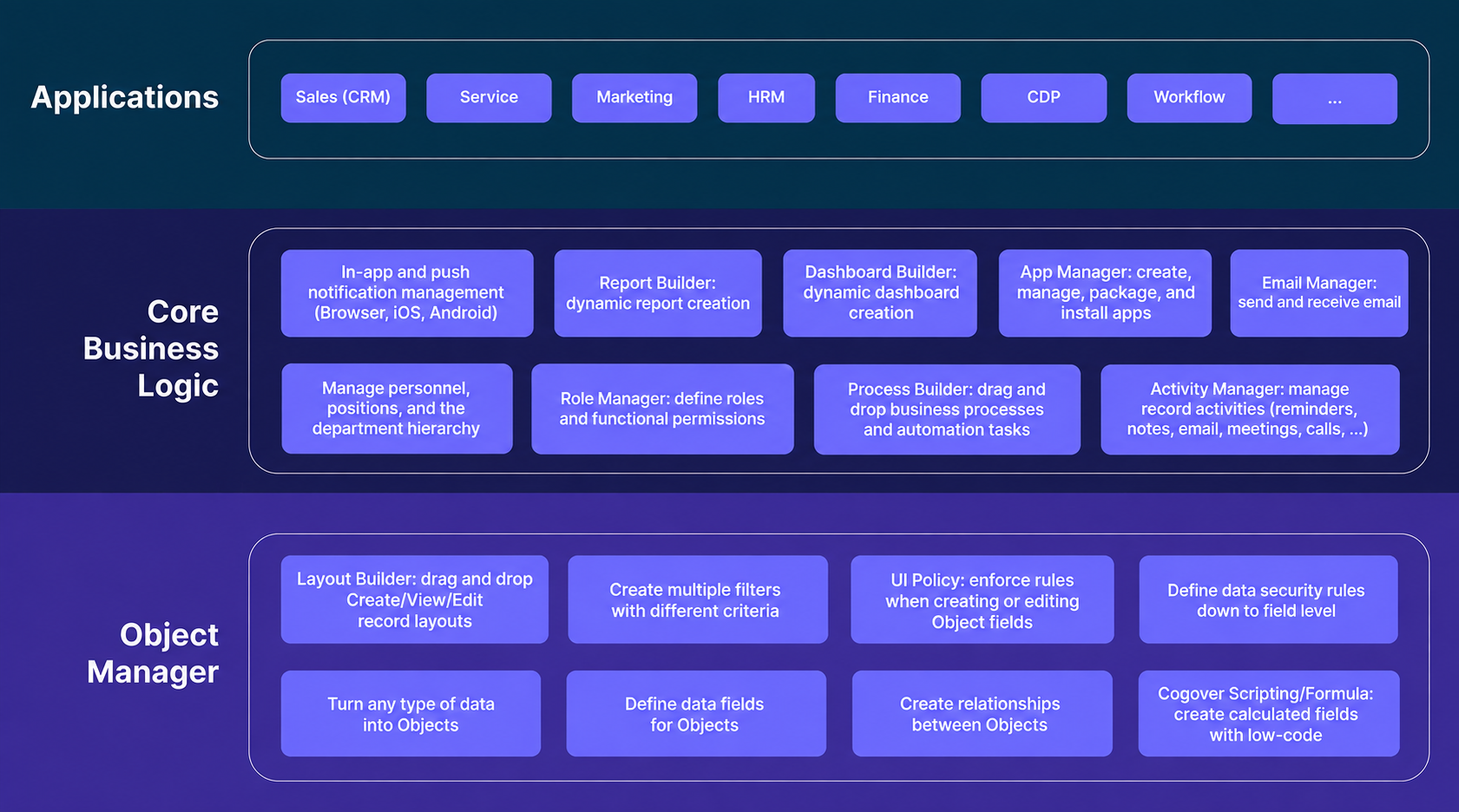
| Tier | Role | Main components |
|---|---|---|
| 1. Object Manager | Manages structured data and record interfaces | Objects, fields, layouts, actions, UI Rules, Data Security Rules, Transition Rules, Duplicate Rules, and Field Change History |
| 2. Business Logic | Applies business logic to data from Tier 1 | Processes, App/Menu, roles and permissions, notifications, document templates, Assignment Rules, email, reports, dashboards, and API access |
| 3. Application | Provides business applications configured for each workspace | Sales, Inventory, People, Process, Omni Channel, Finance, Service, Manufacture, and Goal |
Tier 1 — Object Manager
Object Manager turns business data into structured Objects. An Object is comparable to a database table, a Field to a column, and a Record to a row. Unlike a plain data table, an Object includes record interfaces, permissions, and administration modules.
Design the database model before adding low-code features
For a new application, design the data model before creating workspace configuration:
- Identify the entities the system needs to manage.
- Define the attributes and states of each entity.
- Design one-to-one, one-to-many, and many-to-many relationships.
- Select the appropriate field type for each attribute.
- Create Objects in dependency order. An Object referenced by a lookup must exist before the Object that contains the lookup.
- Add layouts, Owner, Transition Rules, UI Rules, Data Security Rules, Duplicate Rules, Field Change History, and actions where required by the business process.
For a many-to-many relationship, use either a multi-value lookup or an intermediate Object. Use an intermediate Object when the relationship has attributes of its own. For example, an order line connects an Order to a Product while also storing quantity, unit price, or discount.
Select fields by data meaning and behavior
Available field groups include text, numbers, currency, percentages, choices, dates and times, files, Object relationships, and calculated fields. Select a field type according to how the data will be entered, validated, and used:
- Use an auto-generated number when the identifier must be assigned by the system rather than entered manually.
- Use a currency field for monetary values instead of a general decimal field.
- Use a single-choice field for a state or category with a controlled set of options.
- Use a date or time range when the business record requires both a start and an end.
- Use Formula for calculations within a record and relationship summaries for values aggregated from related records.
- Use a dependent relationship when a child record has no meaning without its parent. Verify actual deletion behavior instead of assuming cascade deletion.
Object administration modules
Object Manager provides eight main capability groups:
- Object & Field Definition: defines Objects, fields, options, Formulas, and relationships. Formula uses Cogover Scripting, whose syntax is similar to Java and supports expressions, conditions, loops, data types, and business functions.
- Layout Builder: designs Create, View/Edit, or combined Create/View/Edit interfaces. Fields are placed in Sections and Groups, and each Group can have its own column count.
- Actions and Action Sequences: defines operations on records and links multiple actions into a sequence.
- UI Rules: shows or hides fields and makes them required or read-only based on data conditions.
- Data Security Rules: controls permission to view, edit, or delete records based on Owner, department, role, and sharing scope.
- Transition Rules: defines allowed state transitions, pre-transition conditions, and actions that run before or after a transition.
- Duplicate Rules: detects and handles duplicate records using selected comparison fields.
- Field Change History: records the previous value, new value, time, and user responsible for a field change.
A layout can use JavaScript for advanced interface behavior, including show/hide rules, required or read-only fields, restricted choices, automatic values, and related-list operations. Before changing an existing layout, inspect its current configuration and script so that unrelated logic remains intact.
Tier 2 — Business Logic
Business Logic combines Object Manager data and interfaces into processes, permissions, menus, documents, reports, and integrations.
Select a Process by its start mechanism
| Process type | When to use it | Example |
|---|---|---|
| Manual Flow | A user submits a form to start the Process | Leave request, purchase request, or payment request |
| Normal Flow | An authorized user starts a processing sequence directly | Recalculate data or run an on-demand business operation |
| Scheduled Flow | Work runs on a schedule | Deadline reminders, SLA checks, or periodic aggregation |
| Triggered Flow | A data change or integration signal starts the Process | Assign a new Lead or respond when an Order changes state |
| Sequence Flow | A record follows a sequence of steps | Onboarding, Lead nurturing, or a follow-up sequence |
Process design starts with the objective, start event, completion criteria, participants, run/view/cancel permissions, and exception branches. For a Process that includes an integration, account for timeouts, retries, errors, and repeated requests.
Typical Process components include User Task, Gateway, Loop, Variable, Assignment, Organization, Wait, Sub Process, Send Email, Send HTTP Request, Send Notification, Get/Create/Update Record, To Do, Phone Call, Omni Message, and Export Record.
Permission layers
Menu visibility and data access are separate configurations. Verify permissions at four levels:
- App and menu: whether the user can see the entry point.
- Object: which record types the user can create, read, update, or delete.
- Record: which records the user can access based on owner, organizational structure, role, or business conditions.
- Process: which Processes the user can start, view, work on, or cancel.
Test each permission scenario with at least one account that should be allowed and one that should be denied.
Reports and dashboards
A report presents Object data as a saved table, group, metric, or chart. Verify its data, filters, permissions, and result before placing it on a dashboard. If a report or dashboard must appear in an App, configure the corresponding menu entry and access permissions.
Integration requirements
Cogover API allows external systems to work with platform resources. Each API group uses its own authentication mechanism. For every integration, verify permissions, pagination, error handling, retry and idempotency behavior, and any effect on Processes, validation, or data security. Do not store authentication details in a repository or log.
In addition to Processes, the Business Logic tier provides the following functions:
- App and Menu: groups Objects, saved filters, reports, dashboards, and related pages into a menu structure for a user group.
- Roles and permissions: manages App/menu access, Object permissions, record-level Data Security, and Process permissions.
- Notifications: sends notifications for events such as a new record, a state change, a due date, or an approval result.
- Document templates: uses dynamic data to generate requests, minutes, contracts, and other business documents.
- Assignment Rules: distributes records by condition, personnel group, schedule, or workload.
- Email integration: connects workspace or personal email for sending, receiving, and linking history to records.
The available configuration for notifications, Assignment Rules, and email must be checked on the target workspace. A notification, email, or assignment step inside a Process does not replace the corresponding configuration module.
Tier 3 — Application
Application domains are assembled from Objects, layouts, rules, Processes, permissions, reports, dashboards, and App menus from the two lower tiers.
| Application domain | Standard scope or reference model |
|---|---|
| Sales | Accounts and contacts; Leads, Opportunities, competitors, and partners; Quotes, Contracts, Products, Price Books, Orders, support requests, Campaigns, and units of measure |
| Inventory | Warehouse configuration, locations, and supply routes; quantity/batch/serial tracking; units and product bundles; receipts, issues, and transfers; FIFO/LIFO/FEFO allocation; Excel import; Order synchronization; stocktaking; stock ledgers; valuation; and reports |
| People | Personnel, departments, positions, roles, and internal Processes |
| Process | Design, activation, monitoring, and testing of BPMN Processes |
| Omni Channel | Multi-channel conversations; members and customer profiles; assignee transfer and queues; AI Agents; permissions; labels; read status; messages; interactions; search; and notifications |
| Finance | Customer and vendor invoices; purchasing and payment requests; cash receipts and payments; installment schedules; deposits; receivables and payables; advances and settlements; budgets; cash-flow forecasts; and statements |
| Service | Contact Center and Call Center functions for receiving, routing, and tracking customer interactions |
| Manufacture | Multi-level BOMs; Manufacturing Orders; batch/serial-managed materials; material issue and consumption; production stages; output; finished-goods receipt; and Repair Orders |
| Goal | Real-time definition, tracking, and measurement of goals and indicators |
The platform can also model domains such as Order Management, Warranty, Purchasing, Reseller, E-Commerce, Ticket, and Task Management. These are not default modules in every workspace; inspect the actual configuration before planning implementation.
How the tiers connect
- Object Manager to Business Logic: an Object becomes input data for a Process. For example, creating a Lead record can start a Triggered Flow that assigns the Lead.
- Business Logic to Application: Processes, permissions, menus, reports, and dashboards are assembled into the experience provided by an application.
- Cross-tier changes: adding or changing an Object, field, layout, Process, or App can affect components that already reference it. Review dependencies and retest the affected functions.
Design and change principles
- For an existing application, inspect its current configuration before making changes, preserve anything outside the requested scope, and verify the result afterward.
- For a new application, complete business analysis and data modeling before creating Objects or application configuration.
- Create Objects in dependency order; a lookup target must exist first.
- Verify report data and results before placing a report on a dashboard.
- Test permissions with at least one account that should be allowed and one that should be denied.
- After a change, read back the configuration and run a representative business scenario.
Conclusion
Object Manager provides structured data and record interfaces. Business Logic uses that data for Processes, permissions, menus, documents, reports, and integrations. Application assembles components from the two lower tiers for each business domain and workspace.
When designing or changing a configuration, start with the data model, verify the current workspace state, and retest related components across all three tiers.